Saturday, February 16, 2013

Static IPv6 point-to-point tunnels configuration.

This post is just a refresher, because knowledge that you don't use prone to vanish.
For point-to-point tunnels there are two options available - manual tunnels (RFC 4213) and GRE tunnels (RFC 2784). Both options support IGPs, IPv6 multicast, etc. Besides, GRE tunnels can carry not only IPv6 payload.
Let's consider both options. The topology is as following:
Basic configuration is straightforward using OSPF as IGP for interconnects and loopback interfaces. R1 as example:
ipv6 unicast-routing
!
interface Loopback0
 ip address 1.1.1.1 255.255.255.255
 ip ospf 1 area 0
!
interface FastEthernet0/0
 ip address 10.0.12.1 255.255.255.0
 ip ospf network point-to-point
 ip ospf 1 area 0
!
interface FastEthernet0/1
 no ip address
 ipv6 address 2001::1/64
!
R1#show ip route
     1.0.0.0/32 is subnetted, 1 subnets
C       1.1.1.1 is directly connected, Loopback0
     2.0.0.0/32 is subnetted, 1 subnets
O       2.2.2.2 [110/2] via 10.0.12.2, 00:05:33, FastEthernet0/0
     3.0.0.0/32 is subnetted, 1 subnets
O       3.3.3.3 [110/3] via 10.0.12.2, 00:05:33, FastEthernet0/0
     10.0.0.0/24 is subnetted, 2 subnets
C       10.0.12.0 is directly connected, FastEthernet0/0
O       10.0.23.0 [110/2] via 10.0.12.2, 00:05:33, FastEthernet0/0
R1#show ipv6 route
C   2001::/64 [0/0]
     via ::, FastEthernet0/1
L   2001::1/128 [0/0]
     via ::, FastEthernet0/1
L   FF00::/8 [0/0]
     via ::, Null0
R1#ping 3.3.3.3
Type escape sequence to abort.
Sending 5, 100-byte ICMP Echos to 3.3.3.3, timeout is 2 seconds:
!!!!!
Success rate is 100 percent (5/5), round-trip min/avg/max = 28/52/80 ms
R1#ping 2001::100
Type escape sequence to abort.
Sending 5, 100-byte ICMP Echos to 2001::100, timeout is 2 seconds:
!!!!!
Success rate is 100 percent (5/5), round-trip min/avg/max = 16/28/52 ms

R2 is IPv4-only enabled and can be represented as IPv4-only cloud.

Manual IPv6 point-to-point tunnels.
R1:

interface Tunnel0 #Tunnel number is only locally significant and doesn't have to match on both ends.
 no ip address
 ipv6 address 2013::1/64
#After setting up this interface will be treated as regular interface.
 ipv6 ospf 1 area 0 #To reach remote prefixes you can use static routes instead.
 tunnel source Loopback0 #You can specify source interface or IP address. It only have to be in the up/up state, otherwise tunnel interface won't become up/up.
 tunnel destination 3.3.3.3 #This pair of source and destination have to match on both ends of the tunnel.
 tunnel mode ipv6ip #Default mode is GRE.
!
interface FastEthernet0/1
 no ip address
 ipv6 address 2001::1/64
#Don't forget to add client's prefixes into IPv6 IGP.
 ipv6 ospf 1 area 0
R3:
interface Tunnel1
 no ip address
 ipv6 address 2013::3/64
 ipv6 ospf 1 area 0
 tunnel source 3.3.3.3
#If a network has redundant paths it is better to use logical interfaces for reachability.
 tunnel destination 1.1.1.1
 tunnel mode ipv6ip
!
interface FastEthernet0/0
 no ip address
 ipv6 address 2002::1/64
 ipv6 ospf 1 area 0

So, that's it:
R1#show ipv6 route
C   2001::/64 [0/0]
     via ::, FastEthernet0/1
L   2001::1/128 [0/0]
     via ::, FastEthernet0/1
O   2002::/64 [110/11112]
     via FE80::303:303, Tunnel0
C   2013::/64 [0/0]
     via ::, Tunnel0
L   2013::1/128 [0/0]
     via ::, Tunnel0
L   FF00::/8 [0/0]
     via ::, Null0
   
VPCS[1]> ping 2002::100
2002::100 icmp6_seq=1 ttl=60 time=90.000 ms
2002::100 icmp6_seq=2 ttl=60 time=90.000 ms
2002::100 icmp6_seq=3 ttl=60 time=95.000 ms
2002::100 icmp6_seq=4 ttl=60 time=85.000 ms
2002::100 icmp6_seq=5 ttl=60 time=100.000 ms

VPCS[1]> tracert 2002::100
traceroute to 2002::100, 64 hops max
 1 2001::1   35.000 ms  30.000 ms  25.000 ms
 2 2013::3   65.000 ms  80.000 ms  65.000 ms
 3 2002::100   90.000 ms  85.000 ms  100.000 ms


One thing to mention:
R1#show ipv6 interface tunnel 0 | include FE80
  IPv6 is enabled, link-local address is FE80::101:101
R3#show ipv6 interface tunnel 1 | include FE80
  IPv6 is enabled, link-local address is FE80::303:303

In Link-Local address of manual IPv6 tunnel interfaces last 32 bits represent configured source IPv4 address.

GRE IPv6 point-to-point tunnels.
The only difference in configuration is encapsulation type. And as IOS default to "tunnel mode gre ip" you can just omit command "tunnel mode" (it won't be displayed in the configuration anyway).
R1:
interface Tunnel0
 no ip address
 ipv6 address 2013::1/64
 ipv6 ospf 1 area 0
 tunnel source Loopback0
 tunnel destination 3.3.3.3

R3:
interface Tunnel1
 no ip address
 ipv6 address 2013::3/64
 ipv6 ospf 1 area 0
 tunnel source 3.3.3.3
 tunnel destination 1.1.1.1

And the result is the same:
VPCS[2]> tracert 2001::100
traceroute to 2001::100, 64 hops max
 1 2002::1   35.000 ms  20.000 ms  25.000 ms
 2 2013::1   75.000 ms  75.000 ms  75.000 ms
 3 2001::100   95.000 ms  90.000 ms  90.000 ms

Nevertheless GRE tunnel interfaces are slightly different:
R1#show ipv6 interface tunnel 0 | include FE80
  IPv6 is enabled, link-local address is FE80::C000:13FF:FEA8:0

Link-Local address is derived from first physical interface using EUI-64:
R1#show interfaces fastEthernet 0/0 | include bia
  Hardware is Gt96k FE, address is c200.13a8.0000 (bia c200.13a8.0000)

This is because tunnel interface is a logical interface, thus it doesn't have physical mac-address.
These tunnel types also use different MTU values due to different encapsulation headers.

Saturday, January 12, 2013

OSPFv3 configuration.

This lab tries to duplicate the previous one but this time with OSPFv3. I am going to implement all the OSPF features from this post.
The topology was also changed for the simplicity sake and now is as following:
Although in this lab I could use Link-Local only addresses on the interconnects (the reasons were explained in this post).I used global unicast addresses.
At first only basic configs:
R1:
ipv6 unicast-routing #It is required for IPv6 dynamic routing protocols to work.
!
interface Loopback0
 ip address 1.1.1.1 255.255.255.255
#If you don't have any IPv4 interface in the Up/Up state, you will need to manually configure router-id under the router configuration or routing process won't start.
!
interface FastEthernet0/0.1
 encapsulation dot1Q 1 native
 ipv6 address 2001::1/64
 ipv6 ospf 1 area 1
#You don't have to specify "network" command anymore. Such a relief for someone.
!
interface FastEthernet0/0.12
 encapsulation dot1Q 12
 ipv6 address 2012::1/64
 ipv6 ospf 1 area 2
!
interface FastEthernet0/0.13
 encapsulation dot1Q 13
 ipv6 address 2013::1/64
 ipv6 ospf hello-interval 5
#OSPF hello and dead intervlas are configured almost the same as for OSPFv2.
 ipv6 ospf dead-interval 10 #And both parameters still have to match on both ends of the link.
 ipv6 ospf 1 area 1
!
ipv6 router ospf 1
#Process number is still only locally significant. (Each router will use different process-id).
 log-adjacency-changes
 auto-cost reference-bandwidth 1000
#I changed the reference-bandwidth in order to decrease metric values in the routing table.
 passive-interface default
 no passive-interface FastEthernet0/0.12
 no passive-interface FastEthernet0/0.13


R2:
ipv6 unicast-routing
!
interface Loopback0
 ip address 2.2.2.2 255.255.255.255
!
interface FastEthernet0/0.2
 encapsulation dot1Q 2
 ipv6 address 2002::1/64
 ipv6 ospf 2 area 2
!
interface FastEthernet0/0.12
 encapsulation dot1Q 12
 ipv6 address 2012::2/64
 ipv6 ospf 2 area 2
!
interface FastEthernet0/0.24
 encapsulation dot1Q 24
 ipv6 address 2024::2/64
!
ipv6 router ospf 2
 log-adjacency-changes
 auto-cost reference-bandwidth 1000
 passive-interface FastEthernet0/0.2
 passive-interface FastEthernet0/0.24

 
R3:
ipv6 unicast-routing
!
interface Loopback0
 ip address 3.3.3.3 255.255.255.255
!
interface FastEthernet0/0.3
 encapsulation dot1Q 3
 ipv6 address 2003::1/64
 ipv6 ospf 3 area 0
!
interface FastEthernet0/0.13
 encapsulation dot1Q 13
 ipv6 address 2013::3/64
 ipv6 ospf hello-interval 5
#
The same timers as on R1.
 ipv6 ospf dead-interval 10
 ipv6 ospf 3 area 1
!
interface FastEthernet0/0.34
 encapsulation dot1Q 34
 ipv6 address 2034::3/64
 ipv6 mtu 1400
#As with OSPFv2 MTU mismatch can cause unexpected results.
 ipv6 ospf 3 area 3
!
interface FastEthernet0/0.35
 encapsulation dot1Q 35
 ipv6 address 2035::3/64
 ipv6 ospf network point-to-point
#Network types logically the same.
 ipv6 ospf 3 area 0
!
ipv6 router ospf 3
 log-adjacency-changes
 auto-cost reference-bandwidth 1000
R4:
ipv6 unicast-routing
!
interface Loopback0
 ip address 4.4.4.4 255.255.255.255
!
interface FastEthernet0/0.4
 encapsulation dot1Q 4
 ipv6 address 2004::1/64
 ipv6 ospf 4 area 3
!
interface FastEthernet0/0.24
 encapsulation dot1Q 24
 ipv6 address 2024::4/64
!
interface FastEthernet0/0.34
 encapsulation dot1Q 34
 ipv6 address 2034::4/63
 ipv6 mtu 1400
 ipv6 ospf 4 area 3
!
interface FastEthernet0/0.46
 encapsulation dot1Q 46
 ipv6 address 2046::4/64
 ipv6 ospf network non-broadcast
#This prevents OSPF multicast on the interface, which requires static neighbor specification. See below.
 ipv6 ospf neighbor FE80::C002:15FF:FE18:0
#You can use only Link-Local address for neighbors.
 ipv6 ospf 4 area 4
!
ipv6 router ospf 4
 log-adjacency-changes
 auto-cost reference-bandwidth 1000

 
R5:
ipv6 unicast-routing
!
interface Loopback0
 ip address 5.5.5.5 255.255.255.255
!
interface FastEthernet0/0.5
 encapsulation dot1Q 5
 ipv6 address 2005::1/64
 ipv6 ospf 5 area 0
!
interface FastEthernet0/0.35
 encapsulation dot1Q 35
 ipv6 address 2035::5/64
 ipv6 ospf network point-to-point
 ipv6 ospf 5 area 0
!
interface FastEthernet0/0.56
 encapsulation dot1Q 56
 ipv6 address 2056::5/64
 ipv6 ospf 5 area 4
!
ipv6 router ospf 5
 router-id 55.55.55.55
#Notice that RID was changed although interface loopback 0 was preconfigured. This kind of reconfiguraation requires process clearing.
 log-adjacency-changes
 auto-cost reference-bandwidth 1000

 
R6:
ipv6 unicast-routing
!
interface Loopback0
 ip address 6.6.6.6 255.255.255.255
!
interface FastEthernet0/0.6
 encapsulation dot1Q 6
 ipv6 address 2006::1/64
 ipv6 ospf cost 1
#You also can change the metric of the route by adjusting the bandwidth.
 ipv6 ospf 6 area 4
!
interface FastEthernet0/0.46
 encapsulation dot1Q 46
 ipv6 address 2046::6/64
 ipv6 ospf network non-broadcast
 ipv6 ospf priority 200
#Even though network type non-broadcast prevents dynamic neighbor discovery, they still form DR/BDR relationship.
 ipv6 ospf neighbor FE80::C000:15FF:FE18:0
 ipv6 ospf 6 area 4
!
interface FastEthernet0/0.56
 encapsulation dot1Q 56
 ipv6 address 2056::6/64
 ipv6 ospf 6 area 4
!
ipv6 router ospf 6
 log-adjacency-changes
 auto-cost reference-bandwidth 1000
 maximum-paths 13
#It is still the same and depend on the platform.


While I was performing this basic configuration I noticed that at least my IOS (12.4) doesn't support "max-lsa" command. Maybe they think that low-end routers wouldn't use OSPFv3.1

Just to check that everything is working as expected:
R3#show ipv6 route ospf
O   2001::/64 [110/20]
     via FE80::C003:15FF:FE18:0, FastEthernet0/0.13
O   2001::1/128 [110/10]
     via FE80::C003:15FF:FE18:0, FastEthernet0/0.13
O   2004::/64 [110/20]
     via FE80::C000:15FF:FE18:0, FastEthernet0/0.34
O   2005::/64 [110/20]
     via FE80::C001:15FF:FE18:0, FastEthernet0/0.35
OI  2006::/64 [110/21]
     via FE80::C001:15FF:FE18:0, FastEthernet0/0.35
O   2034::/63 [110/10]
     via ::, FastEthernet0/0.34
OI  2046::/64 [110/30]
     via FE80::C001:15FF:FE18:0, FastEthernet0/0.35
OI  2056::/64 [110/20]
     via FE80::C001:15FF:FE18:0, FastEthernet0/0.35

At this point area 2 is orphaned (no 2002::/64 prefix), let's create a virtual link for it:
R1:
ipv6 router ospf 1
 area 1 virtual-link 3.3.3.3 authentication ipsec spi 256 md5 ABCDEFABCDEFABCDEFABCDEFABCDEFAB

R3:
ipv6 router ospf 3
 area 1 virtual-link 1.1.1.1 authentication ipsec spi 256 md5 ABCDEFABCDEFABCDEFABCDEFABCDEFAB

You can use IPSec stack for either authentication or encryption but not both.
R3#show ipv6 ospf 3 neighbor
Neighbor ID     Pri   State           Dead Time   Interface ID    Interface
1.1.1.1           1   FULL/  -           -        31              OSPFv3_VL0
55.55.55.55       1   FULL/  -        00:00:35    27              FastEthernet0/0.35
1.1.1.1           1   FULL/BDR        00:00:09    28              FastEthernet0/0.13
4.4.4.4           1   FULL/BDR        00:00:31    28              FastEthernet0/0.34
R3#show ipv6 route ospf
O   2001::/64 [110/20]
     via FE80::C003:15FF:FE18:0, FastEthernet0/0.13
O   2001::1/128 [110/10]
     via FE80::C003:15FF:FE18:0, FastEthernet0/0.13
OI  2002::/64 [110/30]
     via FE80::C003:15FF:FE18:0, FastEthernet0/0.13
O   2004::/64 [110/20]
     via FE80::C000:15FF:FE18:0, FastEthernet0/0.34
O   2005::/64 [110/20]
     via FE80::C001:15FF:FE18:0, FastEthernet0/0.35
OI  2012::/64 [110/20]
     via FE80::C003:15FF:FE18:0, FastEthernet0/0.13
O   2034::/63 [110/10]
     via ::, FastEthernet0/0.34
OI  2056::/64 [110/20]
     via FE80::C001:15FF:FE18:0, FastEthernet0/0.35

2002::/64 is now here.
OSPFv3 doesn't support useless clear text authentication, it relies on IPSec instead. But the implementation is pretty complicated unlike EIGRP for IPv6. So let's try other features.

Route summarization.
There are two options for it - summary on ABR and ASBR. There is no ASBR yet, so let's implement summarization on R5:
interface Loopback0
 ip address 5.5.5.5 255.255.255.255
 ipv6 address 2100::1/64
 ipv6 ospf network point-to-point
#Without this network type statement these prefixes will be advertised as /128.
 ipv6 ospf 5 area 4
!
interface Loopback1
 no ip address
 ipv6 address 2101::1/64
 ipv6 ospf network point-to-point
 ipv6 ospf 5 area 4
R3#show ipv6 route ospf
<output omitted>
OI  2100::/64 [110/11]
     via FE80::C001:15FF:FE18:0, FastEthernet0/0.35
OI  2101::/64 [110/11]
     via FE80::C001:15FF:FE18:0, FastEthernet0/0.35
Both prefixes are here now. Back to R5:
ipv6 router ospf 5
 area 4 range 2100::/15
R3#show ipv6 route ospf
<output omitted>
OI  2100::/15 [110/11]
     via FE80::C001:15FF:FE18:0, FastEthernet0/0.35

So there are no more specific prefixes.
Now let's make R1 ASBR by adding a couple of loopback into the RIPng:
interface Loopback0
 ip address 1.1.1.1 255.255.255.255
 ipv6 address 2200::1/64
 ipv6 rip RIP enable
!
interface Loopback1
 no ip address
 ipv6 address 2201::1/64
 ipv6 rip RIP enable
!
ipv6 router ospf 1
 redistribute rip RIP include-connected
#Interestingly, by default IPv6 IGPs don't redistribute connected networks. In this case it would lead to that OSPFv3 won't redistribute any RIPng prefixes.
R3#show ipv6 route ospf
<output omitted>
OE2  2200::/64 [110/20]
     via FE80::C003:15FF:FE18:0, FastEthernet0/0.13
OE2  2201::/64 [110/20]
     via FE80::C003:15FF:FE18:0, FastEthernet0/0.13

And after summarization on ASBR:
ipv6 router ospf 1
 summary-prefix 2200::/15
R3#show ipv6 route ospf
<output omitted>
OE2  2200::/15 [110/20]
     via FE80::C003:15FF:FE18:0, FastEthernet0/0.13

Also notice that OSPFv3 as OSPFv2 has a default metric value for redistributed prefixes.

Route filtering.
At first let's try distribute list. It is not exactly route filtering (actual LSAs are still in the LSDB, but particular prefix won't be installed in the routing table).
Before:
R4#show ipv6 route 2200::/15
OE2  2200::/15 [110/20]
     via FE80::C005:15FF:FE18:0, FastEthernet0/0.34

And after:
ipv6 router ospf 4
 distribute-list prefix-list no2200::/15 in #Only prefix lists are supported.
!
ipv6 prefix-list no2200::/15 seq 5 deny 2200::/15
ipv6 prefix-list no2200::/15 seq 10 permit ::/0 le 128
R4#show ipv6 route 2200::/15
% Route not found

But the LSA is still in the LSDB:
R4#show ipv6 ospf database | begin External
                Type-5 AS External Link States
ADV Router      Age         Seq#        Prefix
1.1.1.1         635         0x80000001  2200::/15


In OSPFv2 world you are able to filter LSA 3, 5 and 7 with filter lists. But you cannot do it with OSPFv3, which is pretty strange. The only design option is using stub areas with the default route.

Stub areas.
There are not so much routers in my topology, so I will combine area types.
Let's make area 3 stub area, which will lead to absence of LSA 5.
R4 actually has a link in the area 4 which have to be shutdown to prevent LSA5 leak.
interface FastEthernet0/0.46
 shutdown
!
R4#show ipv6 ospf database | begin External
                Type-5 AS External Link States
ADV Router      Age         Seq#        Prefix
1.1.1.1         1778        0x80000003  2200::/15

After making area 3 stub:
R3:
ipv6 router ospf 3
 area 3 stub

R4:
ipv6 router ospf 4
 area 3 stub
R4#show ipv6 ospf database external
            OSPFv3 Router with ID (4.4.4.4) (Process ID 4)
R4#

Ok, now let's make this area totally stubby (just add "no-summary" on the ABR):
R4#show ipv6 ospf database | begin Inter
                Inter Area Prefix Link States (Area 3)
ADV Router      Age         Seq#        Prefix
3.3.3.3         464         0x8000000C  2013::/64
3.3.3.3         464         0x8000000C  2035::/64
3.3.3.3         1497        0x80000009  2003::/64
3.3.3.3         464         0x80000008  2005::/64
3.3.3.3         464         0x80000008  2056::/64
3.3.3.3         985         0x80000004  2100::/15
3.3.3.3         464         0x80000004  2001::/64
3.3.3.3         464         0x80000004  2001::1/128
3.3.3.3         464         0x80000004  2035::3/128
3.3.3.3         464         0x80000004  2012::/64
3.3.3.3         464         0x80000004  2002::/64
3.3.3.3         269         0x80000001  ::/0
3.3.3.3         57          0x80000001  2046::/64
3.3.3.3         57          0x80000001  2006::/64


R3:
ipv6 router ospf 3
 area 3 stub no-summary
R4#show ipv6 ospf database
            OSPFv3 Router with ID (4.4.4.4) (Process ID 4)
                Router Link States (Area 3)
ADV Router      Age         Seq#        Fragment ID  Link count  Bits
3.3.3.3         62          0x8000001B  0            1           B
4.4.4.4         22          0x80000023  0            1           None
                Net Link States (Area 3)
ADV Router      Age         Seq#        Link ID    Rtr count
3.3.3.3         259         0x80000001  28         2
                Inter Area Prefix Link States (Area 3)
ADV Router      Age         Seq#        Prefix
3.3.3.3         80          0x80000002  ::/0
                Link (Type-8) Link States (Area 3)
ADV Router      Age         Seq#        Link ID    Interface
3.3.3.3         393         0x8000000A  28         Fa0/0.34
4.4.4.4         56          0x8000000F  28         Fa0/0.34
4.4.4.4         62          0x80000001  26         Fa0/0.4
                Intra Area Prefix Link States (Area 3)
ADV Router      Age         Seq#        Link ID    Ref-lstype  Ref-LSID
3.3.3.3         259         0x80000001  28672      0x2002      28
4.4.4.4         56          0x80000010  0          0x2001      0
No more LSA3 there. And R4 receives a default route:
R4#show ipv6 route ospf
<output omitted>
OI  ::/0 [110/11]
     via FE80::C005:15FF:FE18:0, FastEthernet0/0.34


Area 5 is a great candidate for NSSA area type, because it already has ASBR, but stubby area cannot be a transit area for virtual links:
R3(config-rtr)#area 1 nssa
% OSPFv3: Area cannot be nssa as it contains a virtual link

So let's redistribute something into OSPFv3 from RIPng on R6:
interface Loopback0
 ip address 6.6.6.6 255.255.255.255
 ipv6 address 2300::1/64
 ipv6 rip RIP2 enable
!
interface Loopback1
 no ip address
 ipv6 address 2301::1/64
 ipv6 rip RIP2 enable
!
ipv6 router ospf 6
 redistribute rip RIP2 include-connected
!
ipv6 router rip RIP2

R3#show ipv6 route ospf
<output omitted>
OE2  2300::/64 [110/20]
     via FE80::C001:15FF:FE18:0, FastEthernet0/0.35
OE2  2301::/64 [110/20]
     via FE80::C001:15FF:FE18:0, FastEthernet0/0.35

   
Now let's make area 4 NSSA:
Before:
R6#show ipv6 ospf database | begin External
                Type-5 AS External Link States
ADV Router      Age         Seq#        Prefix
1.1.1.1         990         0x80000004  2200::/15
6.6.6.6         357         0x80000001  2300::/64
6.6.6.6         357         0x80000001  2301::/64


After:
ipv6 router ospf 4
 area 4 nssa
ipv6 router ospf 5
 area 4 nssa
ipv6 router ospf 6
 area 4 nssa
R6#show ipv6 ospf database external
            OSPFv3 Router with ID (6.6.6.6) (Process ID 6)
R6#

And routers inside the NSSA area don't receive default route (as with OSPFv2):
R6#show ipv6 route ::/0
% Route not found


And the final step - make area 4 totally NSSA.
Before:
R6#show ipv6 ospf database
            OSPFv3 Router with ID (6.6.6.6) (Process ID 6)
                Router Link States (Area 4)
ADV Router      Age         Seq#        Fragment ID  Link count  Bits
4.4.4.4         169         0x8000001D  0            1           None
6.6.6.6         48          0x80000179  0            2           E
55.55.55.55     44          0x8000021F  0            1           EB
                Net Link States (Area 4)
ADV Router      Age         Seq#        Link ID    Rtr count
6.6.6.6         196         0x80000001  27         2
55.55.55.55     44          0x8000020B  28         2
                Inter Area Prefix Link States (Area 4)
ADV Router      Age         Seq#        Prefix
55.55.55.55     335         0x8000000A  2035::/64
55.55.55.55     335         0x8000000A  2003::/64
55.55.55.55     335         0x8000000A  2005::/64
55.55.55.55     335         0x8000000A  2034::/64
55.55.55.55     335         0x8000000A  2013::/64
55.55.55.55     335         0x80000006  2001::/64
55.55.55.55     335         0x80000006  2001::1/128
55.55.55.55     335         0x80000006  2035::3/128
55.55.55.55     335         0x80000006  2012::/64
55.55.55.55     335         0x80000006  2002::/64
55.55.55.55     335         0x80000003  2034::/63
55.55.55.55     335         0x80000003  2004::/64
                Type-7 AS External Link States (Area 4)
ADV Router      Age         Seq#        Prefix
6.6.6.6         337         0x80000001  2300::/64
6.6.6.6         337         0x80000001  2301::/64
                Link (Type-8) Link States (Area 4)
ADV Router      Age         Seq#        Link ID    Interface
4.4.4.4         334         0x80000001  29         Fa0/0.46
6.6.6.6         339         0x80000001  27         Fa0/0.46
6.6.6.6         339         0x80000001  26         Fa0/0.6
6.6.6.6         333         0x8000000A  28         Fa0/0.56
55.55.55.55     340         0x80000009  28         Fa0/0.56
                Intra Area Prefix Link States (Area 4)
ADV Router      Age         Seq#        Link ID    Ref-lstype  Ref-LSID
6.6.6.6         196         0x8000001A  0          0x2001      0
6.6.6.6         196         0x80000001  27648      0x2002      27
55.55.55.55     45          0x80000123  0          0x2001      0
55.55.55.55     45          0x8000020B  28672      0x2002      28

After:
R5:
ipv6 router ospf 5
 area 4 nssa no-summary
 R6#show ipv6 ospf database
            OSPFv3 Router with ID (6.6.6.6) (Process ID 6)
                Router Link States (Area 4)
ADV Router      Age         Seq#        Fragment ID  Link count  Bits
4.4.4.4         427         0x80000020  0            1           None
6.6.6.6         21          0x80000189  0            2           E
55.55.55.55     18          0x80000235  0            1           EB
                Net Link States (Area 4)
ADV Router      Age         Seq#        Link ID    Rtr count
4.4.4.4         456         0x80000001  29         2
55.55.55.55     18          0x8000021F  28         2
                Inter Area Prefix Link States (Area 4)
ADV Router      Age         Seq#        Prefix
55.55.55.55     23          0x80000001  ::/0
                Type-7 AS External Link States (Area 4)
ADV Router      Age         Seq#        Prefix
6.6.6.6         482         0x80000001  2300::/64
6.6.6.6         482         0x80000001  2301::/64
                Link (Type-8) Link States (Area 4)
ADV Router      Age         Seq#        Link ID    Interface
4.4.4.4         981         0x80000001  29         Fa0/0.46
6.6.6.6         483         0x80000001  27         Fa0/0.46
6.6.6.6         483         0x80000001  26         Fa0/0.6
6.6.6.6         477         0x8000000B  28         Fa0/0.56
55.55.55.55     989         0x80000009  28         Fa0/0.56
                Intra Area Prefix Link States (Area 4)
ADV Router      Age         Seq#        Link ID    Ref-lstype  Ref-LSID
4.4.4.4         456         0x80000001  29696      0x2002      29
6.6.6.6         466         0x8000001C  0          0x2001      0
55.55.55.55     18          0x80000137  0          0x2001      0
55.55.55.55     18          0x8000021F  28672      0x2002      28

No LSA 3 and 5 any more but the default route instead:
R6#show ipv6 route ::/0
OI  ::/0 [110/11]
     via FE80::C001:15FF:FE18:0, FastEthernet0/0.56


And the last feature - default route propagation:
R5:
ipv6 route ::/0 Loopback0
ipv6 router ospf 5
 default-information originate
R2#show ipv6 route ::/0
OE2  ::/0 [110/1], tag 5
     via FE80::C003:15FF:FE18:0, FastEthernet0/0.12

   
In conclusion, differences between OSPFv3 and OSPFv2:
- distribute-lists support only prefix-lists for route filtering;
- IOS doesn't support filter lists for LSA filtering;
- IOS doesn't support max-lsa command.

Sunday, December 23, 2012

EIGRP for IPv6 configuration.

In this lab I tried to implement all the features of EIGRP from this post but this time with IPv6.
The topology was changed though:
On interconnects link-local addresses only.
At first - only basic EIGRP configuration:
R1:
interface Loopback0
 ip address 1.1.1.1 255.255.255.255
#EIGRP for IPv6 still requires some IPv4 address for it's RID. If there is no any IPv4 interface in the up/up state, EIGRP will set it's RID to "0.0.0.0".
!
interface FastEthernet0/0.1
 encapsulation dot1Q 1 native
 ipv6 address 2001::1/64
 ipv6 eigrp 10
 no ipv6 split-horizon eigrp 10
#Just for example.
!
interface FastEthernet0/0.12
 encapsulation dot1Q 12
 ipv6 enable
 ipv6 eigrp 10

 ipv6 bandwidth-percent eigrp 10 30
!
interface FastEthernet0/0.13
 encapsulation dot1Q 13
 ipv6 enable
 ipv6 eigrp 10
!
ipv6 router eigrp 10
 variance 2
 metric weights 0 0 0 1 0 0
#K values still have to be the same across the domain.
 no shutdown #In implementation for IPv6 EIGRP starts in shutdown mode.
 passive-interface default #Configuration for passive interfaces is the same.
 no passive-interface FastEthernet0/0.12
 no passive-interface FastEthernet0/0.13
 maximum-paths 20


R2:
interface Loopback0
 ip address 2.2.2.2 255.255.255.255
!
interface FastEthernet0/0.2
 encapsulation dot1Q 2
 ipv6 address 2002::1/64
 ipv6 eigrp 10
!
interface FastEthernet0/0.12
 encapsulation dot1Q 12
 ipv6 enable
 ipv6 eigrp 10
!
interface FastEthernet0/0.24
 encapsulation dot1Q 24
 ipv6 enable
 ipv6 eigrp 10
!
ipv6 router eigrp 10
 metric weights 0 0 0 1 0 0
 no shutdown
 passive-interface FastEthernet0/0.2


R3:
interface Loopback0
 ip address 3.3.3.3 255.255.255.255
!
interface FastEthernet0/0.3
 encapsulation dot1Q 3
 ipv6 address 2003::1/64
 ipv6 eigrp 10
 ipv6 eigrp 20
#Actually it is not a new feature. You could do the same with IPv4 using "network" statements instead.
!
interface FastEthernet0/0.13
 encapsulation dot1Q 13
 ipv6 enable
 ipv6 eigrp 10
!
interface FastEthernet0/0.34
 encapsulation dot1Q 34
 ipv6 enable
 ipv6 eigrp 10
!
interface FastEthernet0/0.35
 encapsulation dot1Q 35
 ipv6 enable
 ipv6 eigrp 10
 ipv6 eigrp 20
#In fact the second EIGRP process is used only for demonstration sake. And to show static neighbor configuration.
!
ipv6 router eigrp 10
 metric weights 0 0 0 1 0 0
 no shutdown
 passive-interface FastEthernet0/0.3
!
ipv6 router eigrp 20
 neighbor FE80::C001:1AFF:FE4C:0 FastEthernet0/0.35
#I use only Link-local addresses on the interconnects, therefore I have to specify Link-local address of the neighbor's interface.
 no shutdown
 passive-interface FastEthernet0/0.3


R4:
interface Loopback0
 ip address 4.4.4.4 255.255.255.255
!
interface FastEthernet0/0.4
 encapsulation dot1Q 4
 ipv6 address 2004::1/64
 ipv6 eigrp 10
!
interface FastEthernet0/0.24
 encapsulation dot1Q 24
 ipv6 enable
 ipv6 eigrp 10
!
interface FastEthernet0/0.34
 encapsulation dot1Q 34
 ipv6 enable
 ipv6 eigrp 10
!
interface FastEthernet0/0.46
 encapsulation dot1Q 46
 ipv6 enable
 ipv6 eigrp 10
!
ipv6 router eigrp 10
 metric weights 0 0 0 1 0 0
 no shutdown
 passive-interface FastEthernet0/0.4


R5:
interface Loopback0
 ip address 5.5.5.5 255.255.255.255
!
interface FastEthernet0/0.5
 encapsulation dot1Q 5
 ipv6 address 2005::1/64
 ipv6 eigrp 10
 ipv6 eigrp 20
!
interface FastEthernet0/0.35
 encapsulation dot1Q 35
 ipv6 enable
 ipv6 eigrp 10
 ipv6 eigrp 20
!
interface FastEthernet0/0.56
 encapsulation dot1Q 56
 ipv6 enable
 ipv6 eigrp 10
!
ipv6 router eigrp 10
 metric weights 0 0 0 1 0 0
 no shutdown
 passive-interface FastEthernet0/0.5
!
ipv6 router eigrp 20
 neighbor FE80::C005:1AFF:FE4C:0 FastEthernet0/0.35
 router-id 55.55.55.55
 no shutdown
 passive-interface FastEthernet0/0.5


R6:
interface Loopback0
 ip address 6.6.6.6 255.255.255.255
!
interface FastEthernet0/0.6
 encapsulation dot1Q 6
 ipv6 address 2006::1/64
 ipv6 eigrp 10
!
interface FastEthernet0/0.46
 encapsulation dot1Q 46
 ipv6 enable
 ipv6 eigrp 10
!
interface FastEthernet0/0.56
 encapsulation dot1Q 56
 ipv6 enable
 ipv6 eigrp 10
 ipv6 hello-interval eigrp 10 1
#Only ip version was changed in the syntax.
 ipv6 hold-time eigrp 10 4
!
ipv6 router eigrp 10
 metric weights 0 0 0 1 0 0
 no shutdown
 passive-interface FastEthernet0/0.6
 timers active-time 1


Just to confirm that we have full connectivity:
R1#show ipv6 route eigrp
D   2002::/64 [90/51200]
     via FE80::C004:1AFF:FE4C:0, FastEthernet0/0.12
D   2003::/64 [90/28160]
     via FE80::C005:1AFF:FE4C:0, FastEthernet0/0.13
D   2004::/64 [90/76800]
     via FE80::C004:1AFF:FE4C:0, FastEthernet0/0.12
     via FE80::C005:1AFF:FE4C:0, FastEthernet0/0.13
D   2005::/64 [90/76800]
     via FE80::C005:1AFF:FE4C:0, FastEthernet0/0.13
D   2006::/64 [90/79360]
     via FE80::C005:1AFF:FE4C:0, FastEthernet0/0.13
     via FE80::C004:1AFF:FE4C:0, FastEthernet0/0.12


Now let's implement other features.

Using distribute-list to prevent R1 using link through R3 to 2005::/64 (Loopback0 of R5).
R1:
ipv6 router eigrp 10
 distribute-list prefix-list Deny2005::/64 in FastEthernet0/0.13
#For IPv6 you can use only prefix-list with distribute-list.
!
ipv6 prefix-list Deny2005::/64 seq 5 deny 2005::/64
#Syntax and logic are still the same.
ipv6 prefix-list Deny2005::/64 seq 10 permit ::/0 le 128
!
R1#show ipv6 route 2005::/64
D   2005::/64 [90/104960]
     via FE80::C004:1AFF:FE4C:0, FastEthernet0/0.12
#Now R1 uses R2 as the next-hop for this prefix.
   
Now let's add couple loopbacks on R2 and start advertising a summary route for them.
R2:
interface Loopback1
 no ip address
 ipv6 address 3000::1/64
 ipv6 eigrp 10
!
interface Loopback2
 no ip address
 ipv6 address 3000:0:0:1::1/64
 ipv6 eigrp 10


R1#show ipv6 route eigrp
D   2002::/64 [90/51200]
     via FE80::C004:1AFF:FE4C:0, FastEthernet0/0.12
D   2003::/64 [90/28160]
     via FE80::C005:1AFF:FE4C:0, FastEthernet0/0.13
D   2004::/64 [90/76800]
     via FE80::C005:1AFF:FE4C:0, FastEthernet0/0.13
     via FE80::C004:1AFF:FE4C:0, FastEthernet0/0.12
D   2005::/64 [90/104960]
     via FE80::C004:1AFF:FE4C:0, FastEthernet0/0.12
D   2006::/64 [90/79360]
     via FE80::C005:1AFF:FE4C:0, FastEthernet0/0.13
     via FE80::C004:1AFF:FE4C:0, FastEthernet0/0.12
D   3000::/64 [90/153600]
#Both specific routes are here now.
     via FE80::C004:1AFF:FE4C:0, FastEthernet0/0.12
D   3000:0:0:1::/64 [90/153600]
     via FE80::C004:1AFF:FE4C:0, FastEthernet0/0.12


R2:
interface FastEthernet0/0.12
 ipv6 summary-address eigrp 10 3000::/63 5
!
interface FastEthernet0/0.24
 ipv6 summary-address eigrp 10 3000::/63 5


R1#show ipv6 route eigrp
D   2002::/64 [90/51200]
     via FE80::C004:1AFF:FE4C:0, FastEthernet0/0.12
D   2003::/64 [90/28160]
     via FE80::C005:1AFF:FE4C:0, FastEthernet0/0.13
D   2004::/64 [90/76800]
     via FE80::C005:1AFF:FE4C:0, FastEthernet0/0.13
     via FE80::C004:1AFF:FE4C:0, FastEthernet0/0.12
D   2005::/64 [90/104960]
     via FE80::C004:1AFF:FE4C:0, FastEthernet0/0.12
D   2006::/64 [90/79360]
     via FE80::C005:1AFF:FE4C:0, FastEthernet0/0.13
     via FE80::C004:1AFF:FE4C:0, FastEthernet0/0.12
D   3000::/63 [90/153600]
#And now here is only one summary route.
     via FE80::C004:1AFF:FE4C:0, FastEthernet0/0.12

Now let's advertise a default route from R6. You can use either redistribution or summary. IOS doesn't support "default-network" for IPv6.
interface FastEthernet0/0.46
 ipv6 summary-address eigrp 10 ::/0 200
#Notice that AD is only locally significant.
!
interface FastEthernet0/0.56
 ipv6 summary-address eigrp 10 ::/0 200
#If you don't advertise this route from both interfaces, R5 would learn specific routes (and default route with suboptimal path through R3).

R4#show ipv6 route eigrp #Notice that there is no more any specific routes from R6 (including it's loopback).
D   ::/0 [90/28160]
     via FE80::C002:1AFF:FE4C:0, FastEthernet0/0.46
D   2001::/64 [90/76800]
     via FE80::C004:1AFF:FE4C:0, FastEthernet0/0.24
     via FE80::C005:1AFF:FE4C:0, FastEthernet0/0.34
D   2002::/64 [90/51200]
     via FE80::C004:1AFF:FE4C:0, FastEthernet0/0.24
D   2003::/64 [90/28160]
     via FE80::C005:1AFF:FE4C:0, FastEthernet0/0.34
D   2005::/64 [90/76800]
     via FE80::C005:1AFF:FE4C:0, FastEthernet0/0.34
D   3000::/63 [90/153600]
     via FE80::C004:1AFF:FE4C:0, FastEthernet0/0.24


Let's remove summary from R5:
R3#show ipv6 route 2006::/64
D   2006::/64 [90/53760]
     via FE80::C000:1AFF:FE4C:0, FastEthernet0/0.34
     via FE80::C001:1AFF:FE4C:0, FastEthernet0/0.35

R3 uses two equal-cost paths to reach R6's loopback.
If we define R5 as a stub router it will lead to that R3 will have only one path to 2006::/64 (via R4).
R5:
ipv6 router eigrp 10
 stub connected summary
#Connected and summary - are defaults as with IPv4.
!
R3#show ipv6 route 2006::/64
D   2006::/64 [90/53760]
     via FE80::C000:1AFF:FE4C:0, FastEthernet0/0.34


It seems like IOS doesn't support offset-lists for EIGRPv6 route influencing. At least in my version (12.4). It means that only tools for route influencing is bandwith and delay parameters on related interfaces, which are the same as for IPv4. R4 as example:
R4#show ipv6 route 2003::/64
D   2003::/64 [90/51200]
     via FE80::C005:1CFF:FEB0:0, FastEthernet0/0.34
!
interface FastEthernet0/0.34
 delay 10
!
R4#show ipv6 route 2003::/64
D   2003::/64 [90/28160]
     via FE80::C005:1CFF:FEB0:0, FastEthernet0/0.34

I didn't change the bandwidth because metric weights was changed to not include it in the metric calculations.

The last thing to check - authentication. It is said that EIGRP for IPv6 relies on built-in authentication mechanisms of IPv6 (namely AH/ESP). But configuration is almost the same as with IPv4 (key chains with md5-hashed keys). It means that AH/ESP use md5 under the hood. R5 as example:
key chain EIGRPv6
 key 1
   key-string cisco
!
interface FastEthernet0/0.56
 ipv6 authentication mode eigrp 10 md5
 ipv6 authentication key-chain eigrp 10 EIGRPv6

R6 should be configured the same way to form neighborship:
R6#show ipv6 eigrp neighbors
IPv6-EIGRP neighbors for process 10
H   Address                 Interface       Hold Uptime   SRTT   RTO  Q  Seq
                                            (sec)         (ms)       Cnt Num
0   Link-local address:     Fa0/0.56           3 00:00:26   38   228  0  34
    FE80::C001:1CFF:FEB0:0
1   Link-local address:     Fa0/0.46          12 00:22:17  206  1236  0  29
    FE80::C000:1CFF:FEB0:0

   
In conclusion, differences between EIGRP for IPv6 and IPv4:
- distribute-lists support only prefix-lists for route filtering;
- IOS doesn't support "default-network" command for IPv6;
- EIGRP for IPv6 doesn't support offset-lists.

Friday, December 21, 2012

IPv6: using Link-local only IP on interconnects.

When I think of IPv6 I am always wondering why do I need to use some IP addresses on the devices' interconnections when they already have the Link-local address.
In the IPv4 world you have no choice but use /30 or /31 prefixes. Besides, IPv6 IGPs always use Link-local addresses in the routing updates as the next-hop, although they don't send their Link-local subnets in those updates (but as long as you have next-hop ip and the outgoing interface - it is enough).
There is an example of the topology:
As an IGP I will use EIGRP here. The configuration is as following:
R1:
interface Loopback0
 ip address 1.1.1.1 255.255.255.255
!
interface FastEthernet0/0.1
 encapsulation dot1Q 1 native
 ipv6 address 2001::1/64
 ipv6 eigrp 1
!
interface FastEthernet0/0.13
 encapsulation dot1Q 13
 ipv6 address 2013::1/64
 ipv6 eigrp 1
!
ipv6 router eigrp 1
 no shutdown


R3:
interface Loopback0
 ip address 3.3.3.3 255.255.255.255
!
interface FastEthernet0/0.3
 encapsulation dot1Q 3
 ipv6 address 2003::1/64
 ipv6 eigrp 1
!
interface FastEthernet0/0.13
 encapsulation dot1Q 13
 ipv6 address 2013::3/64
 ipv6 eigrp 1
!
interface FastEthernet0/0.35
 encapsulation dot1Q 35
 ipv6 address 2035::3/64
 ipv6 eigrp 1
!
ipv6 router eigrp 1
 no shutdown


R5:
interface Loopback0
 ip address 5.5.5.5 255.255.255.255
!
interface FastEthernet0/0.5
 encapsulation dot1Q 5
 ipv6 address 2005::1/64
 ipv6 eigrp 1
!
interface FastEthernet0/0.35
 encapsulation dot1Q 35
 ipv6 address 2035::5/64
 ipv6 eigrp 1
!
ipv6 router eigrp 1
 no shutdown


Everything is pretty straightforward here even with those tremendous /64 prefixes on the interconnects.
R1#show ipv6 route           
IPv6 Routing Table - 8 entries
Codes: C - Connected, L - Local, S - Static, R - RIP, B - BGP
       U - Per-user Static route, M - MIPv6
       I1 - ISIS L1, I2 - ISIS L2, IA - ISIS interarea, IS - ISIS summary
       O - OSPF intra, OI - OSPF inter, OE1 - OSPF ext 1, OE2 - OSPF ext 2
       ON1 - OSPF NSSA ext 1, ON2 - OSPF NSSA ext 2
       D - EIGRP, EX - EIGRP external
C   2001::/64 [0/0]
     via ::, FastEthernet0/0.1
L   2001::1/128 [0/0]
     via ::, FastEthernet0/0.1
D   2003::/64 [90/261120]
     via FE80::C005:1DFF:FEFC:0, FastEthernet0/0.13
D   2005::/64 [90/263680]
     via FE80::C005:1DFF:FEFC:0, FastEthernet0/0.13
C   2013::/64 [0/0]
     via ::, FastEthernet0/0.13
L   2013::1/128 [0/0]
     via ::, FastEthernet0/0.13
D   2035::/64 [90/261120]
     via FE80::C005:1DFF:FEFC:0, FastEthernet0/0.13
L   FF00::/8 [0/0]
     via ::, Null0

But as long as IGPs don't use these prefixes (as their IPv4 IGP brothers) we can simply omit them. R1 as example:
interface FastEthernet0/0.13
 encapsulation dot1Q 13
 ipv6 enable
#Firstly remove IPv6 address and then enable only the automatic Link-local address.
 ipv6 eigrp 1
R1#show ipv6 interface brief fa0/0.13
FastEthernet0/0.13         [up/up]
    FE80::C003:1DFF:FEFC:0

After completing the same on all the interconnects:
R1#show ipv6 route
C   2001::/64 [0/0]
     via ::, FastEthernet0/0.1
L   2001::1/128 [0/0]
     via ::, FastEthernet0/0.1
D   2003::/64 [90/261120]
     via FE80::C005:1DFF:FEFC:0, FastEthernet0/0.13
D   2005::/64 [90/263680]
     via FE80::C005:1DFF:FEFC:0, FastEthernet0/0.13
L   FF00::/8 [0/0]
     via ::, Null0
R1#ping 2005::1
Type escape sequence to abort.
Sending 5, 100-byte ICMP Echos to 2005::1, timeout is 2 seconds:
!!!!!
Success rate is 100 percent (5/5), round-trip min/avg/max = 24/52/72 ms

Everything is fine.

From RFC4291:
Link-Local addresses are for use on a single link.
...
Link-Local addresses are designed to be used for addressing on a single link for purposes such as automatic address configuration, neighbor discovery, or when no routers are present.
Routers must not forward any packets with Link-Local source or destination addresses to other links.
Ok let's check it - I removed all Global unicast addresses from R5:
R5#show ipv6 interface brief | exclude down
FastEthernet0/0            [up/up]
FastEthernet0/0.5          [up/up]
    unassigned
FastEthernet0/0.35         [up/up]
    FE80::C001:1BFF:FE9C:0
FastEthernet0/1            [up/up]
Loopback0                  [up/up]
R5#show ipv6 route
D   2001::/64 [90/263680]
     via FE80::C005:1BFF:FE9C:0, FastEthernet0/0.35
L   FF00::/8 [0/0]
     via ::, Null0
R5#ping 2001::1
Type escape sequence to abort.
Sending 5, 100-byte ICMP Echos to 2001::1, timeout is 2 seconds:
.....
Success rate is 0 percent (0/5)
R5#traceroute 2001::1
Type escape sequence to abort.
Tracing the route to 2001::1
  1 FE80::C005:1BFF:FE9C:0 32 msec 24 msec 20 msec
  2  *  *  *
  3  *  *  *

R5 is unable to reach 2001::/64 because it has no non-Link-local addresses. Even though it sends these packets:
But eventually R3 is not forwarding them. Interestingly, that R3 is able to ping 2001::/64:
R3#show ipv6 interface brief | exclude down
FastEthernet0/0            [up/up]
    FE80::C005:1BFF:FE9C:0
FastEthernet0/0.13         [up/up]
    FE80::C005:1BFF:FE9C:0
FastEthernet0/0.35         [up/up]
    FE80::C005:1BFF:FE9C:0
FastEthernet0/1            [up/up]
Loopback0                  [up/up]
R3#ping 2001::1 source fa0/0.35
Type escape sequence to abort.
Sending 5, 100-byte ICMP Echos to 2001::1, timeout is 2 seconds:
Packet sent with a source address of FE80::C005:1BFF:FE9C:0
!!!!!
Success rate is 100 percent (5/5), round-trip min/avg/max = 16/24/32 ms

So, there is only one limitation for not using Link-local only prefixes on the interconnections - routers will not forward packets with a Link-local ip as source or destination.
Nevertheless, at least one Unique local or Global IP you would have on a particular router at least for management, so there would not be any such cases.

Finally, I also encountered something interesting with the traceroute:
R1#traceroute ipv6 2005::1
Type escape sequence to abort.
Tracing the route to 2005::1
  1 2003::1 44 msec 24 msec 24 msec
  2 2005::1 24 msec 64 msec 44 msec

Next-hop for this prefix in the routing table is the Link-local address of R3's interface fa0/0.13 but in this trace R2 appears as it's interface fa0/0.3. As I found in the traceroute output router in the transit will always use any of it's regular IPv6 interfaces in the up/up state. And only when all those interfaces are down it will appear as it's link-local address on the appropriate interface:
R3#show ipv6 interface brief | exclude down
FastEthernet0/0            [up/up]
FastEthernet0/0.3          [up/up]
    FE80::C005:1DFF:FEFC:0
    2003::1
FastEthernet0/0.13         [up/up]
    FE80::C005:1DFF:FEFC:0
FastEthernet0/0.35         [up/up]
    FE80::C005:1DFF:FEFC:0
FastEthernet0/1            [up/up]
Loopback0                  [up/up]

And this is how traceroute looks like after fa0/0.3 on R3 was shut down:
R1#traceroute ipv6 2005::1
Type escape sequence to abort.
Tracing the route to 2005::1
  1 FE80::C005:1DFF:FEFC:0 56 msec 44 msec 20 msec
  2 2005::1 28 msec 52 msec 24 msec


Update:
I received pretty interesting reason why not to use Link-Local only IPs from Marko Milivojevic on CLN:
Correct, but think of multiple paths through the network. If you're always getting responses from the Loopback, how can you tell which path your packets took? ;-)
 So, in conclusion, yes, you can, but it depends.

Wednesday, December 12, 2012

BGP configuration.

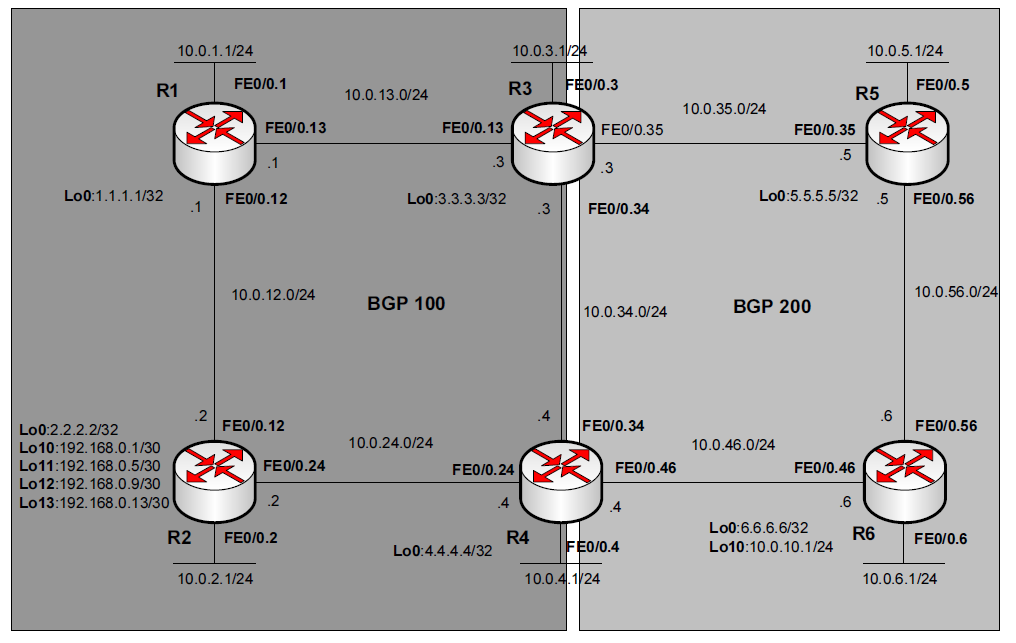
This lab combines almost all CCNP related BGP features. The lab design is as following:
Below are configuration files from all of the routers with comments. Not relevant commands are omitted.

R1:
interface Loopback0 #This loopback is beign used as RID among the routing processess.
 ip address 1.1.1.1 255.255.255.255
!
interface Loopback10
#These loopbacks below was created after BGP configuration. They are used for route summarization.
 ip address 192.168.0.1 255.255.255.252
!
interface Loopback11
 ip address 192.168.0.5 255.255.255.252
!
interface Loopback12
 ip address 192.168.0.9 255.255.255.252
!
interface Loopback13
 ip address 192.168.0.13 255.255.255.252
!
interface FastEthernet0/0.1
 encapsulation dot1Q 1 native
 ip address 10.0.1.1 255.255.255.0
!
interface FastEthernet0/0.12
 encapsulation dot1Q 12
 ip address 10.0.12.1 255.255.255.0
!
interface FastEthernet0/0.13
 encapsulation dot1Q 13
 ip address 10.0.13.1 255.255.255.0
!
router eigrp 1
#iBGP neighbors use full-mesh topology due to BGP split-horizon-like behavior. iBGP peers also use the loopbacks as update-source, so they should be reachable (via IGP or static routes). BGP AS 100 uses EIGRP 1 as it's IGP.
 network 1.1.1.1 0.0.0.0
 network 10.0.1.0 0.0.0.255
 network 10.0.12.0 0.0.0.255
 network 10.0.13.0 0.0.0.255
 network 192.168.0.0 0.0.255.255
 no auto-summary
!
router bgp 100
 no synchronization
#This is the default command. If the synchromization is enabled, a prefix from the iBGP peer won't be considered as best unless this exact prefix was learned from IGP and installed in the routing table.
 bgp log-neighbor-changes
 neighbor 2.2.2.2 remote-as 100
 neighbor 2.2.2.2 update-source Loopback0
 neighbor 3.3.3.3 remote-as 100
 neighbor 3.3.3.3 update-source Loopback0
 neighbor 4.4.4.4 remote-as 100
 neighbor 4.4.4.4 update-source Loopback0
 no auto-summary
#If the mask parameter of the network statement (related to some classful network) is omitted and auto-summary is enabled, router will add this classful network in the table if the exact prefix or any subnets exist in the routing table. If no auto-summary configured, BGP will install this prefix only if the exact prefix exists in the routing table.

R2:
interface Loopback0
 ip address 2.2.2.2 255.255.255.255
!
interface FastEthernet0/0.2
 encapsulation dot1Q 2
 ip address 10.0.2.1 255.255.255.0
!
interface FastEthernet0/0.12
 encapsulation dot1Q 12
 ip address 10.0.12.2 255.255.255.0
!
interface FastEthernet0/0.24
 encapsulation dot1Q 24
 ip address 10.0.24.2 255.255.255.0
!
router eigrp 1
 network 2.2.2.2 0.0.0.0
 network 10.0.2.0 0.0.0.255
 network 10.0.12.0 0.0.0.255
 network 10.0.24.0 0.0.0.255
 no auto-summary
!
router bgp 100
 no synchronization
 bgp log-neighbor-changes
 neighbor 1.1.1.1 remote-as 100
 neighbor 1.1.1.1 update-source Loopback0
 neighbor 3.3.3.3 remote-as 100
 neighbor 3.3.3.3 update-source Loopback0
 neighbor 4.4.4.4 remote-as 100
 neighbor 4.4.4.4 update-source Loopback0
 no auto-summary


R3:
interface Loopback0
 ip address 3.3.3.3 255.255.255.255
!
interface FastEthernet0/0.3
 encapsulation dot1Q 3
 ip address 10.0.3.1 255.255.255.0
!
interface FastEthernet0/0.13
 encapsulation dot1Q 13
 ip address 10.0.13.3 255.255.255.0
!
interface FastEthernet0/0.34
 encapsulation dot1Q 34
 ip address 10.0.34.3 255.255.255.0
!
interface FastEthernet0/0.35
 encapsulation dot1Q 35
 ip address 10.0.35.3 255.255.255.0
!
router eigrp 1
 network 3.3.3.3 0.0.0.0
 network 10.0.13.0 0.0.0.255
 network 10.0.34.0 0.0.0.255
 network 10.0.35.0 0.0.0.255
 no auto-summary
!
router bgp 100
 no synchronization
 bgp log-neighbor-changes
 network 10.0.3.0 mask 255.255.255.0
 redistribute eigrp 1 route-map EIGRP2BGP
#There is two methods for advertising prefixes in the BGP - by network statement (which makes it's Origin code as "i") or by IGP redistribution (Origin code is "?"). When redistributing IGP, you can specify a route-map to filter prefixes or adjust their parameters. Route-map EIGRP2BGP allows only prefix 10.0.1.0/24 to be redistributed into BGP (refer to the route-map and prefix-list below).
 neighbor 1.1.1.1 remote-as 100
 neighbor 1.1.1.1 update-source Loopback0
 neighbor 2.2.2.2 remote-as 100
 neighbor 2.2.2.2 update-source Loopback0
 neighbor 4.4.4.4 remote-as 100
 neighbor 4.4.4.4 update-source Loopback0
 neighbor 10.0.35.5 remote-as 200
#BGP uses some additional security mechanism for eBGP neighbors - it sets TTL=1 which means that neighbor should be in the one hop away. To overcome this (e.g. you are establishing neighborship using loopback interfaces) you can use "ebg-multihop TTL" command.
 neighbor 10.0.35.5 password bgp_pass #BGP supports MD5 authentication, which requires the same password on both neighboring routers.
 neighbor 10.0.35.5 route-map LOCPREF10.0.5.0/24 in #Local preference is being used inside the AS (among the iBGP peers; Local preference is not being advertised to any eBGP peers) to select one and only one exit point for some particular prefix. In this example I am using route-map to set local preference for the exact one prefix 10.0.5.0/24 (refer to the route-map and prefix-list below). Notice, that after applying any route-map for a neighbor you need to reset this peer.
 no auto-summary
!
ip prefix-list net10.0.1.0/24 seq 5 permit 10.0.1.0/24
!
ip prefix-list net10.0.5.0/24 seq 5 permit 10.0.5.0/24
!
route-map EIGRP2BGP permit 10
#In this route-map there is only one permit statement which means that all other prefixes will be filtered due to implicit deny at the end of the route-map.
 match ip address prefix-list net10.0.1.0/24
!
route-map LOCPREF10.0.5.0/24 permit 10
 match ip address prefix-list net10.0.5.0/24
 set local-preference 1000
!
route-map LOCPREF10.0.5.0/24 permit 20
#And in this route-map I set the local-preference for one particular prefix and allowed all other prefixes without any changes.

R4:
interface Loopback0
 ip address 4.4.4.4 255.255.255.255
!
interface FastEthernet0/0.4
 encapsulation dot1Q 4
 ip address 10.0.4.1 255.255.255.0
!
interface FastEthernet0/0.24
 encapsulation dot1Q 24
 ip address 10.0.24.4 255.255.255.0
!
interface FastEthernet0/0.34
 encapsulation dot1Q 34
 ip address 10.0.34.4 255.255.255.0
!
interface FastEthernet0/0.46
 encapsulation dot1Q 46
 ip address 10.0.46.4 255.255.255.0
!
router eigrp 1
 network 4.4.4.4 0.0.0.0
 network 10.0.24.0 0.0.0.255
 network 10.0.34.0 0.0.0.255
 network 10.0.46.0 0.0.0.255
 no auto-summary
!
router bgp 100
 no synchronization
 bgp log-neighbor-changes
 network 192.168.0.0 mask 255.255.255.252
#In order to advertise summary route you need at least one subnet in the BGP table.
 network 192.168.0.4 mask 255.255.255.252
 network 192.168.0.8 mask 255.255.255.252
 network 192.168.0.12 mask 255.255.255.252
 aggregate-address 192.168.0.0 255.255.255.240 summary-only
#Key-word "summary-only" suppresses advertisement of subnets for this summary route.
 neighbor 1.1.1.1 remote-as 100
 neighbor 1.1.1.1 update-source Loopback0
 neighbor 2.2.2.2 remote-as 100
 neighbor 2.2.2.2 update-source Loopback0
 neighbor 3.3.3.3 remote-as 100
 neighbor 3.3.3.3 update-source Loopback0
 neighbor 10.0.46.6 remote-as 200
 neighbor 10.0.46.6 route-map DENY10.0.6.0/24 in
#You can filter particular prefixes from being advertised to neighbors using route-maps, prefix-lists, filter-lists (for AS access-lists) and distribute lists. Route-map is the most flexible tool among these. This one filters prefix 10.0.6.0/24 and allows all others.
 no auto-summary
!
ip prefix-list net10.0.6.0/24 seq 5 permit 10.0.6.0/24
!
route-map DENY10.0.6.0/24 deny 10
 match ip address prefix-list net10.0.6.0/24
!
route-map DENY10.0.6.0/24 permit 20


R5:
interface Loopback0
 ip address 5.5.5.5 255.255.255.255
!
interface FastEthernet0/0.5
 encapsulation dot1Q 5
 ip address 10.0.5.1 255.255.255.0
!
interface FastEthernet0/0.35
 encapsulation dot1Q 35
 ip address 10.0.35.5 255.255.255.0
!
interface FastEthernet0/0.56
 encapsulation dot1Q 56
 ip address 10.0.56.5 255.255.255.0
!
router ospf 1
#BGP AS 200 uses OSPF as its' IGP.
 log-adjacency-changes
 network 10.0.35.0 0.0.0.255 area 0
 network 10.0.56.0 0.0.0.255 area 0
!
router bgp 200
 no synchronization
 bgp router-id 5.5.5.55
#If no RID was specified, BGP (as other routing protocols) will use highest loopback IP and, if none configured, highest non-loopback interface in the up/up state.
 bgp log-neighbor-changes
 network 10.0.5.0 mask 255.255.255.0
 network 10.0.56.0 mask 255.255.255.0
 neighbor 10.0.35.3 remote-as 100
 neighbor 10.0.35.3 password bgp_pass
 neighbor 10.0.35.3 soft-reconfiguration inbound
#In case of requirement to see advertised routes from a prticular neighbor, you need to configure this feature. It actually consumes some additional memory to store all updates from neighbor before filtering (show ip bgp neighbor 10.0.35.3 received-routes).
 neighbor 10.0.35.3 route-map WEIGHT10.0.1.0/24 in #Weight is only locally significant an is not being advertised to any neighbors. But you can indirectly influence the path for particular prefix, because BGP advertises only its' best routes. This particular route-map sets weight of 10000 for one prefix - 10.0.1.0/24 (refer to the route-map and access-list below).
 neighbor 10.0.56.6 remote-as 200
 no auto-summary
!
access-list 1 permit 10.0.1.0 0.0.0.255
!
route-map WEIGHT10.0.1.0/24 permit 10
 match ip address 1
 set weight 10000
!
route-map WEIGHT10.0.1.0/24 permit 20


R6:
interface Loopback0
 ip address 6.6.6.6 255.255.255.255
!
interface Loopback10
 ip address 10.0.10.1 255.255.255.0
!
interface FastEthernet0/0.6
 encapsulation dot1Q 6
 ip address 10.0.6.1 255.255.255.0
!
interface FastEthernet0/0.46
 encapsulation dot1Q 46
 ip address 10.0.46.6 255.255.255.0
!
interface FastEthernet0/0.56
 encapsulation dot1Q 56
 ip address 10.0.56.6 255.255.255.0
router ospf 1
 log-adjacency-changes
 network 10.0.56.0 0.0.0.255 area 0
#Notice that this OSPF process doesn't advertise network on the interconnection link between R4 and R6. In BGP terms this means that routes received from R4 will not be used by R5 via R6 because next-hop-ip (R4) will be unreachable. This is because iBGP peers by default don't change next-hop address of advertised prefixes. To overcome this you can use static routes or "next-hop-self statement" (refer to the BGP configuration below).
!
router bgp 200
 no synchronization
 bgp log-neighbor-changes
 network 10.0.6.0 mask 255.255.255.0
 network 10.0.10.0 mask 255.255.255.0
 network 10.0.56.0 mask 255.255.255.0
 neighbor 10.0.46.4 remote-as 100
 neighbor 10.0.46.4 route-map ASPATH192.168.0.0/28 in
#Another way to influence the path selection is the AS-Path prepend mechanism (BGP will choose those routes with the shortest AS_Path attribute). This particular route-map prepends 5 autonomous systems (refer to the route-map and prefix-list below) to one particular prefix - 192.168.0.0/28 (aggregate route from R4).
 neighbor 10.0.46.4 route-map MED10.0.10.0/24 out #In order to influence path selection in the neighboring AS you can set MED value and advertise prefixes with this MED into neighboring AS. The mechanics behind the scene is somehow similar to EIGRP feasible successor selection - you set higher MED value for less preferable prefixes and vise versa. This route-map sets metric (MED) to 20000 for prefix 10.0.10.0/24 (refer to the route-map and prefix-list configuration below).
 neighbor 10.0.56.5 remote-as 200
 neighbor 10.0.56.5 next-hop-self
#As was mentioned in the OSPF section above you can advertise prefixes to iBGP peers changing default next-hop to itself to overcome the issue with the next-hop reachability.
 neighbor 10.0.56.5 route-map ORIGIN10.0.5.0/24 in #Another tool to influence inbound routes is setting the code of origin (e - EGP, i - Internal, ? - Incomplete). The preference is as follows: i -> e -> ?. This route-map sets code of origin to "e" for prefix 10.0.5.0/24.
 no auto-summary
!
ip prefix-list net10.0.10.0/24 seq 5 permit 10.0.10.0/24
!
ip prefix-list net10.0.5.0/24 seq 5 permit 10.0.5.0/24
!
ip prefix-list net192.168.0.0/28 seq 5 permit 192.168.0.0/16 ge 28 le 28
!
route-map ASPATH192.168.0.0/28 permit 10
 match ip address prefix-list net192.168.0.0/28
 set as-path prepend 1 2 3 4 5
!
route-map ASPATH192.168.0.0/28 permit 20
!
route-map ORIGIN10.0.5.0/24 permit 10
 match ip address prefix-list net10.0.5.0/24
 set origin egp 10
!
route-map ORIGIN10.0.5.0/24 permit 20
!
route-map MED10.0.10.0/24 permit 10
 match ip address prefix-list net10.0.10.0/24
 set metric 20000
!
route-map MED10.0.10.0/24 permit 20


To verify these features here is the actual output from the routers:
R1#show ip route
     1.0.0.0/32 is subnetted, 1 subnets
C       1.1.1.1 is directly connected, Loopback0
     2.0.0.0/32 is subnetted, 1 subnets
D       2.2.2.2 [90/409600] via 10.0.12.2, 02:06:17, FastEthernet0/0.12
     3.0.0.0/32 is subnetted, 1 subnets
D       3.3.3.3 [90/409600] via 10.0.13.3, 02:09:14, FastEthernet0/0.13
     4.0.0.0/32 is subnetted, 1 subnets
D       4.4.4.4 [90/435200] via 10.0.13.3, 00:03:49, FastEthernet0/0.13
                [90/435200] via 10.0.12.2, 00:03:49, FastEthernet0/0.12
C    198.18.0.0/24 is directly connected, FastEthernet0/1
     10.0.0.0/24 is subnetted, 13 subnets
B       10.0.10.0 [200/0] via 10.0.35.5, 00:04:58
C       10.0.12.0 is directly connected, FastEthernet0/0.12
C       10.0.13.0 is directly connected, FastEthernet0/0.13
D       10.0.2.0 [90/307200] via 10.0.12.2, 02:11:58, FastEthernet0/0.12
B       10.0.3.0 [200/0] via 3.3.3.3, 00:12:00
C       10.0.1.0 is directly connected, FastEthernet0/0.1
B       10.0.6.0 [200/0] via 10.0.35.5, 00:04:58
B       10.0.5.0 [200/0] via 10.0.35.5, 00:12:00
D       10.0.24.0 [90/307200] via 10.0.12.2, 02:11:02, FastEthernet0/0.12
D       10.0.46.0 [90/332800] via 10.0.13.3, 00:03:49, FastEthernet0/0.13
                  [90/332800] via 10.0.12.2, 00:03:49, FastEthernet0/0.12
D       10.0.34.0 [90/307200] via 10.0.13.3, 00:03:49, FastEthernet0/0.13
D       10.0.35.0 [90/307200] via 10.0.13.3, 01:50:50, FastEthernet0/0.13
B       10.0.56.0 [200/0] via 10.0.35.5, 00:12:00
     192.168.0.0/24 is variably subnetted, 5 subnets, 2 masks
C       192.168.0.8/30 is directly connected, Loopback12
C       192.168.0.12/30 is directly connected, Loopback13
C       192.168.0.0/30 is directly connected, Loopback10
B       192.168.0.0/28 [200/0] via 4.4.4.4, 00:13:17
C       192.168.0.4/30 is directly connected, Loopback11
R2#show ip route
     1.0.0.0/32 is subnetted, 1 subnets
D       1.1.1.1 [90/409600] via 10.0.12.1, 00:03:40, FastEthernet0/0.12
     2.0.0.0/32 is subnetted, 1 subnets
C       2.2.2.2 is directly connected, Loopback0
     3.0.0.0/32 is subnetted, 1 subnets
D       3.3.3.3 [90/435200] via 10.0.24.4, 00:03:42, FastEthernet0/0.24
                [90/435200] via 10.0.12.1, 00:03:42, FastEthernet0/0.12
     4.0.0.0/32 is subnetted, 1 subnets
D       4.4.4.4 [90/409600] via 10.0.24.4, 00:03:42, FastEthernet0/0.24
C    198.18.0.0/24 is directly connected, FastEthernet0/1
     10.0.0.0/24 is subnetted, 13 subnets
B       10.0.10.0 [200/0] via 10.0.35.5, 00:04:52
C       10.0.12.0 is directly connected, FastEthernet0/0.12
D       10.0.13.0 [90/307200] via 10.0.12.1, 00:03:43, FastEthernet0/0.12
C       10.0.2.0 is directly connected, FastEthernet0/0.2
B       10.0.3.0 [200/0] via 3.3.3.3, 00:11:54
D       10.0.1.0 [90/307200] via 10.0.12.1, 00:03:40, FastEthernet0/0.12
B       10.0.6.0 [200/0] via 10.0.35.5, 00:04:52
B       10.0.5.0 [200/0] via 10.0.35.5, 00:11:54
C       10.0.24.0 is directly connected, FastEthernet0/0.24
D       10.0.46.0 [90/307200] via 10.0.24.4, 00:03:42, FastEthernet0/0.24
D       10.0.34.0 [90/307200] via 10.0.24.4, 00:03:43, FastEthernet0/0.24
D       10.0.35.0 [90/332800] via 10.0.24.4, 00:03:43, FastEthernet0/0.24
                  [90/332800] via 10.0.12.1, 00:03:43, FastEthernet0/0.12
B       10.0.56.0 [200/0] via 10.0.46.6, 00:03:06
     192.168.0.0/24 is variably subnetted, 5 subnets, 2 masks
D       192.168.0.8/30 [90/409600] via 10.0.12.1, 00:03:40, FastEthernet0/0.12
D       192.168.0.12/30
           [90/409600] via 10.0.12.1, 00:03:40, FastEthernet0/0.12
D       192.168.0.0/30 [90/409600] via 10.0.12.1, 00:03:40, FastEthernet0/0.12
B       192.168.0.0/28 [200/0] via 4.4.4.4, 00:13:11
D       192.168.0.4/30 [90/409600] via 10.0.12.1, 00:03:40, FastEthernet0/0.12
R3#show ip route
     1.0.0.0/32 is subnetted, 1 subnets
D       1.1.1.1 [90/409600] via 10.0.13.1, 02:06:51, FastEthernet0/0.13
     2.0.0.0/32 is subnetted, 1 subnets
D       2.2.2.2 [90/435200] via 10.0.34.4, 00:03:33, FastEthernet0/0.34
                [90/435200] via 10.0.13.1, 00:03:33, FastEthernet0/0.13
     3.0.0.0/32 is subnetted, 1 subnets
C       3.3.3.3 is directly connected, Loopback0
     4.0.0.0/32 is subnetted, 1 subnets
D       4.4.4.4 [90/409600] via 10.0.34.4, 02:08:13, FastEthernet0/0.34
C    198.18.0.0/24 is directly connected, FastEthernet0/1
     10.0.0.0/24 is subnetted, 13 subnets
B       10.0.10.0 [20/0] via 10.0.35.5, 00:04:43
D       10.0.12.0 [90/307200] via 10.0.13.1, 00:03:33, FastEthernet0/0.13
C       10.0.13.0 is directly connected, FastEthernet0/0.13
D       10.0.2.0 [90/332800] via 10.0.34.4, 00:03:33, FastEthernet0/0.34
                 [90/332800] via 10.0.13.1, 00:03:33, FastEthernet0/0.13
C       10.0.3.0 is directly connected, FastEthernet0/0.3
D       10.0.1.0 [90/307200] via 10.0.13.1, 02:10:46, FastEthernet0/0.13
B       10.0.6.0 [20/0] via 10.0.35.5, 00:04:43
B       10.0.5.0 [20/0] via 10.0.35.5, 00:11:45
D       10.0.24.0 [90/307200] via 10.0.34.4, 02:10:46, FastEthernet0/0.34
D       10.0.46.0 [90/307200] via 10.0.34.4, 01:50:23, FastEthernet0/0.34
C       10.0.34.0 is directly connected, FastEthernet0/0.34
C       10.0.35.0 is directly connected, FastEthernet0/0.35
B       10.0.56.0 [20/0] via 10.0.35.5, 00:11:45
     192.168.0.0/24 is variably subnetted, 5 subnets, 2 masks
D       192.168.0.8/30 [90/409600] via 10.0.13.1, 01:38:12, FastEthernet0/0.13
D       192.168.0.12/30
           [90/409600] via 10.0.13.1, 01:38:12, FastEthernet0/0.13
D       192.168.0.0/30 [90/409600] via 10.0.13.1, 01:38:12, FastEthernet0/0.13
B       192.168.0.0/28 [200/0] via 4.4.4.4, 00:11:45
D       192.168.0.4/30 [90/409600] via 10.0.13.1, 01:38:12, FastEthernet0/0.13
R4#show ip route
     1.0.0.0/32 is subnetted, 1 subnets
D       1.1.1.1 [90/435200] via 10.0.34.3, 00:03:24, FastEthernet0/0.34
                [90/435200] via 10.0.24.2, 00:03:24, FastEthernet0/0.24
     2.0.0.0/32 is subnetted, 1 subnets
D       2.2.2.2 [90/409600] via 10.0.24.2, 00:03:24, FastEthernet0/0.24
     3.0.0.0/32 is subnetted, 1 subnets
D       3.3.3.3 [90/409600] via 10.0.34.3, 02:08:50, FastEthernet0/0.34
     4.0.0.0/32 is subnetted, 1 subnets
C       4.4.4.4 is directly connected, Loopback0
C    198.18.0.0/24 is directly connected, FastEthernet0/1
     10.0.0.0/24 is subnetted, 14 subnets
B       10.0.10.0 [200/0] via 10.0.35.5, 00:04:34
D       10.0.12.0 [90/307200] via 10.0.24.2, 00:03:24, FastEthernet0/0.24
D       10.0.13.0 [90/307200] via 10.0.34.3, 00:03:24, FastEthernet0/0.34
D       10.0.2.0 [90/307200] via 10.0.24.2, 00:03:24, FastEthernet0/0.24
B       10.0.3.0 [200/0] via 3.3.3.3, 00:11:36
D       10.0.1.0 [90/332800] via 10.0.34.3, 00:03:24, FastEthernet0/0.34
                 [90/332800] via 10.0.24.2, 00:03:24, FastEthernet0/0.24
B       10.0.6.0 [200/0] via 10.0.35.5, 00:04:34
C       10.0.4.0 is directly connected, FastEthernet0/0.4
B       10.0.5.0 [200/0] via 10.0.35.5, 00:11:36
C       10.0.24.0 is directly connected, FastEthernet0/0.24
C       10.0.46.0 is directly connected, FastEthernet0/0.46
C       10.0.34.0 is directly connected, FastEthernet0/0.34
D       10.0.35.0 [90/307200] via 10.0.34.3, 01:50:26, FastEthernet0/0.34
B       10.0.56.0 [20/0] via 10.0.46.6, 00:05:18
     192.168.0.0/24 is variably subnetted, 5 subnets, 2 masks
D       192.168.0.8/30 [90/435200] via 10.0.34.3, 00:03:24, FastEthernet0/0.34
                       [90/435200] via 10.0.24.2, 00:03:24, FastEthernet0/0.24
D       192.168.0.12/30
           [90/435200] via 10.0.34.3, 00:03:24, FastEthernet0/0.34
           [90/435200] via 10.0.24.2, 00:03:24, FastEthernet0/0.24
D       192.168.0.0/30 [90/435200] via 10.0.34.3, 00:03:24, FastEthernet0/0.34
                       [90/435200] via 10.0.24.2, 00:03:24, FastEthernet0/0.24
B       192.168.0.0/28 [200/0] via 0.0.0.0, 00:12:53, Null0
D       192.168.0.4/30 [90/435200] via 10.0.34.3, 00:03:25, FastEthernet0/0.34
                       [90/435200] via 10.0.24.2, 00:03:25, FastEthernet0/0.24
R5#show ip route
     5.0.0.0/32 is subnetted, 1 subnets
C       5.5.5.5 is directly connected, Loopback0
C    198.18.0.0/24 is directly connected, FastEthernet0/1
     10.0.0.0/24 is subnetted, 7 subnets
B       10.0.10.0 [200/0] via 10.0.56.6, 00:04:24
B       10.0.3.0 [20/0] via 10.0.35.3, 00:11:26
B       10.0.1.0 [20/307200] via 10.0.35.3, 00:11:26
B       10.0.6.0 [200/0] via 10.0.56.6, 00:04:24
C       10.0.5.0 is directly connected, FastEthernet0/0.5
C       10.0.35.0 is directly connected, FastEthernet0/0.35
C       10.0.56.0 is directly connected, FastEthernet0/0.56
     192.168.0.0/28 is subnetted, 1 subnets
B       192.168.0.0 [20/0] via 10.0.35.3, 00:11:26
R6#show ip route
     6.0.0.0/32 is subnetted, 1 subnets
C       6.6.6.6 is directly connected, Loopback0
C    198.18.0.0/24 is directly connected, FastEthernet0/1
     10.0.0.0/24 is subnetted, 8 subnets
C       10.0.10.0 is directly connected, Loopback10
B       10.0.3.0 [20/0] via 10.0.46.4, 00:04:57
B       10.0.1.0 [20/0] via 10.0.46.4, 00:04:57
C       10.0.6.0 is directly connected, FastEthernet0/0.6
B       10.0.5.0 [200/0] via 10.0.56.5, 00:04:57
C       10.0.46.0 is directly connected, FastEthernet0/0.46
O       10.0.35.0 [110/20] via 10.0.56.5, 01:32:27, FastEthernet0/0.56
C       10.0.56.0 is directly connected, FastEthernet0/0.56
     192.168.0.0/28 is subnetted, 1 subnets
B       192.168.0.0 [200/0] via 10.0.35.3, 00:04:57


R1#show ip bgp
BGP table version is 75, local router ID is 1.1.1.1
   Network          Next Hop            Metric LocPrf Weight Path
*>i10.0.3.0/24      3.3.3.3                  0    100      0 i
*>i10.0.5.0/24      10.0.35.5                0   1000      0 200 i
*>i10.0.6.0/24      10.0.35.5                0    100      0 200 i
*>i10.0.10.0/24     10.0.35.5                0    100      0 200 i
* i10.0.56.0/24     10.0.46.6                0    100      0 200 i
*>i                 10.0.35.5                0    100      0 200 i
*>i192.168.0.0/28   4.4.4.4                  0    100      0 i
R2#show ip bgp
BGP table version is 88, local router ID is 2.2.2.2
   Network          Next Hop            Metric LocPrf Weight Path
r>i10.0.1.0/24      10.0.13.1           307200    100      0 ?
*>i10.0.3.0/24      3.3.3.3                  0    100      0 i
*>i10.0.5.0/24      10.0.35.5                0   1000      0 200 i
*>i10.0.6.0/24      10.0.35.5                0    100      0 200 i
*>i10.0.10.0/24     10.0.35.5                0    100      0 200 i
*>i10.0.56.0/24     10.0.46.6                0    100      0 200 i
* i                 10.0.35.5                0    100      0 200 i
*>i192.168.0.0/28   4.4.4.4                  0    100      0 i
R3#show ip bgp
BGP table version is 12, local router ID is 3.3.3.3
   Network          Next Hop            Metric LocPrf Weight Path
*> 10.0.1.0/24      10.0.13.1           307200         32768 ?
*> 10.0.3.0/24      0.0.0.0                  0         32768 i
*> 10.0.5.0/24      10.0.35.5                0   1000      0 200 i
*> 10.0.6.0/24      10.0.35.5                              0 200 i
*> 10.0.10.0/24     10.0.35.5                              0 200 i
* i10.0.56.0/24     10.0.46.6                0    100      0 200 i
*>                  10.0.35.5                0             0 200 i
*>i192.168.0.0/28   4.4.4.4                  0    100      0 i
R4#show ip bgp
BGP table version is 52, local router ID is 4.4.4.4
   Network          Next Hop            Metric LocPrf Weight Path
r>i10.0.1.0/24      10.0.13.1           307200    100      0 ?
*>i10.0.3.0/24      3.3.3.3                  0    100      0 i
*  10.0.5.0/24      10.0.46.6                              0 200 e
*>i                 10.0.35.5                0   1000      0 200 i
*>i10.0.6.0/24      10.0.35.5                0    100      0 200 i
*>i10.0.10.0/24     10.0.35.5                0    100      0 200 i
*                   10.0.46.6            20000             0 200 i
*> 10.0.56.0/24     10.0.46.6                0             0 200 i
* i                 10.0.35.5                0    100      0 200 i
s> 192.168.0.0/30   10.0.24.2           435200         32768 i
*> 192.168.0.0/28   0.0.0.0                            32768 i
s> 192.168.0.4/30   10.0.24.2           435200         32768 i
s> 192.168.0.8/30   10.0.24.2           435200         32768 i
s> 192.168.0.12/30  10.0.24.2           435200         32768 i
R5#show ip bgp
BGP table version is 47, local router ID is 5.5.5.55
   Network          Next Hop            Metric LocPrf Weight Path
* i10.0.1.0/24      10.0.56.6                0    100      0 100 ?
*>                  10.0.35.3           307200         10000 100 ?
* i10.0.3.0/24      10.0.56.6                0    100      0 100 i
*>                  10.0.35.3                0             0 100 i
*> 10.0.5.0/24      0.0.0.0                  0         32768 i
*>i10.0.6.0/24      10.0.56.6                0    100      0 i
*>i10.0.10.0/24     10.0.56.6                0    100      0 i
* i10.0.56.0/24     10.0.56.6                0    100      0 i
*>                  0.0.0.0                  0         32768 i
*> 192.168.0.0/28   10.0.35.3                              0 100 i
R6#show ip bgp
BGP table version is 10, local router ID is 10.0.10.1
   Network          Next Hop            Metric LocPrf Weight Path
* i10.0.1.0/24      10.0.35.3           307200    100      0 100 ?
*>                  10.0.46.4                              0 100 ?
* i10.0.3.0/24      10.0.35.3                0    100      0 100 i
*>                  10.0.46.4                              0 100 i
*>i10.0.5.0/24      10.0.56.5                0    100      0 e
*> 10.0.6.0/24      0.0.0.0                  0         32768 i
*> 10.0.10.0/24     0.0.0.0                  0         32768 i
*> 10.0.56.0/24     0.0.0.0                  0         32768 i
* i                 10.0.56.5                0    100      0 i
*>i192.168.0.0/28   10.0.35.3                0    100      0 100 i
*                   10.0.46.4                0             0 1 2 3 4 5 100 i


R1#show ip bgp summary
BGP router identifier 1.1.1.1, local AS number 100
BGP table version is 75, main routing table version 75
6 network entries using 720 bytes of memory
7 path entries using 364 bytes of memory
5/4 BGP path/bestpath attribute entries using 620 bytes of memory
1 BGP AS-PATH entries using 24 bytes of memory
0 BGP route-map cache entries using 0 bytes of memory
0 BGP filter-list cache entries using 0 bytes of memory
BGP using 1728 total bytes of memory
BGP activity 13/7 prefixes, 55/48 paths, scan interval 60 secs
Neighbor        V    AS MsgRcvd MsgSent   TblVer  InQ OutQ Up/Down  State/PfxRcd
2.2.2.2         4   100     129     129       75    0    0 02:05:30        0
3.3.3.3         4   100     186     140       75    0    0 00:12:32        5
4.4.4.4         4   100     173     137       75    0    0 00:13:37        2
R2#show ip bgp summary
BGP router identifier 2.2.2.2, local AS number 100
BGP table version is 88, main routing table version 88
7 network entries using 840 bytes of memory
8 path entries using 416 bytes of memory
6/5 BGP path/bestpath attribute entries using 744 bytes of memory
1 BGP AS-PATH entries using 24 bytes of memory
0 BGP route-map cache entries using 0 bytes of memory
0 BGP filter-list cache entries using 0 bytes of memory
BGP using 2024 total bytes of memory
BGP activity 14/7 prefixes, 59/51 paths, scan interval 60 secs
Neighbor        V    AS MsgRcvd MsgSent   TblVer  InQ OutQ Up/Down  State/PfxRcd
1.1.1.1         4   100     129     129       88    0    0 02:05:23        0
3.3.3.3         4   100     184     139       88    0    0 00:12:25        6
4.4.4.4         4   100     172     136       88    0    0 00:13:30        2
R3#show ip bgp summary
BGP router identifier 3.3.3.3, local AS number 100
BGP table version is 12, main routing table version 12
7 network entries using 840 bytes of memory
8 path entries using 416 bytes of memory
8/6 BGP path/bestpath attribute entries using 992 bytes of memory
1 BGP AS-PATH entries using 24 bytes of memory
0 BGP route-map cache entries using 0 bytes of memory
0 BGP filter-list cache entries using 0 bytes of memory
Bitfield cache entries: current 3 (at peak 4) using 96 bytes of memory
BGP using 2368 total bytes of memory
BGP activity 35/28 prefixes, 67/59 paths, scan interval 60 secs
Neighbor        V    AS MsgRcvd MsgSent   TblVer  InQ OutQ Up/Down  State/PfxRcd
1.1.1.1         4   100     139     186       12    0    0 00:12:17        0
2.2.2.2         4   100     138     184       12    0    0 00:12:17        0
4.4.4.4         4   100     189     202       12    0    0 00:12:15        2
10.0.35.5       4   200     214     205       12    0    0 00:12:16        4
R4#show ip bgp summary
BGP router identifier 4.4.4.4, local AS number 100
BGP table version is 52, main routing table version 52
11 network entries using 1320 bytes of memory
14 path entries using 728 bytes of memory
10/7 BGP path/bestpath attribute entries using 1240 bytes of memory
1 BGP AS-PATH entries using 24 bytes of memory
0 BGP route-map cache entries using 0 bytes of memory
0 BGP filter-list cache entries using 0 bytes of memory
Bitfield cache entries: current 3 (at peak 4) using 96 bytes of memory
BGP using 3408 total bytes of memory
BGP activity 43/32 prefixes, 85/71 paths, scan interval 60 secs
Neighbor        V    AS MsgRcvd MsgSent   TblVer  InQ OutQ Up/Down  State/PfxRcd
1.1.1.1         4   100     137     173       52    0    0 00:13:12        0
2.2.2.2         4   100     136     172       52    0    0 00:13:13        0
3.3.3.3         4   100     202     190       52    0    0 00:12:06        6
10.0.46.6       4   200     205     232       52    0    0 00:05:23        3
R5#show ip bgp summary
BGP router identifier 5.5.5.55, local AS number 200
BGP table version is 47, main routing table version 47
7 network entries using 840 bytes of memory
11 path entries using 572 bytes of memory
8/5 BGP path/bestpath attribute entries using 992 bytes of memory
1 BGP AS-PATH entries using 24 bytes of memory
0 BGP route-map cache entries using 0 bytes of memory
0 BGP filter-list cache entries using 0 bytes of memory
Bitfield cache entries: current 3 (at peak 4) using 96 bytes of memory
BGP using 2524 total bytes of memory
1 received paths for inbound soft reconfiguration
BGP activity 34/27 prefixes, 98/87 paths, scan interval 60 secs
Neighbor        V    AS MsgRcvd MsgSent   TblVer  InQ OutQ Up/Down  State/PfxRcd
10.0.35.3       4   100     204     215       47    0    0 00:11:56        3
10.0.56.6       4   200     250     250       47    0    0 00:05:12        5
R6#show ip bgp summary
BGP router identifier 10.0.10.1, local AS number 200
BGP table version is 10, main routing table version 10
7 network entries using 840 bytes of memory
11 path entries using 572 bytes of memory
11/5 BGP path/bestpath attribute entries using 1364 bytes of memory
2 BGP AS-PATH entries using 64 bytes of memory
0 BGP route-map cache entries using 0 bytes of memory
0 BGP filter-list cache entries using 0 bytes of memory
Bitfield cache entries: current 3 (at peak 3) using 96 bytes of memory
BGP using 2936 total bytes of memory
BGP activity 51/44 prefixes, 113/102 paths, scan interval 60 secs
Neighbor        V    AS MsgRcvd MsgSent   TblVer  InQ OutQ Up/Down  State/PfxRcd
10.0.46.4       4   100     232     206       10    0    0 00:05:04        3
10.0.56.5       4   200     250     252       10    0    0 00:05:04        5